
beantown53
Ready to race!
Disclaimer: Use these instructions at YOUR own risk. In other words, you break it, you own it.
I searched for a long time for instructions on how to take apart my 2011 Kessy FOB and I could not find them. So, I took the plunge and disassembled my Kessy FOB. This procedure requires some cutting of the case but in places that are out-of-sight.
01) Remove battery cover (IMG03.jpg)
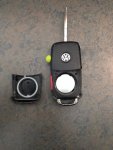
02) The front pin is under the key (IMG04.jpg)
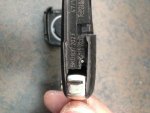
03) The rear pin is runs parallel of the key ring (IMG05.jpg)
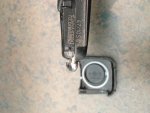
04) You have to cut out the bottom left-hand corner to get access to the rear pin (IMG06.jpg)
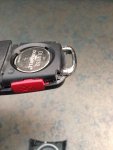
05) With a thin screwdriver, push the rear pin left-to-right (IMG07.jpg)
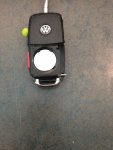
06) You have to cut around the front pin so you can get a needle-nose plier on it (IMG08.jpg)
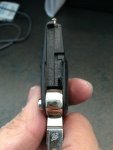
07) With both of the pins removed, you can now unsnap the case apart, starting at the panic button (IMG10.jpg
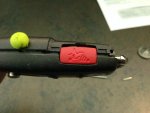
08) Work your way around to the right-side (IMG11.jpg)
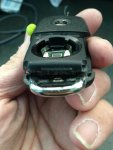
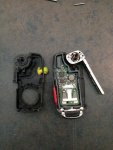
09) This is what it looks like with the cover off (IMG12.jpg)
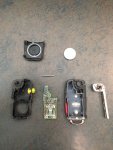
10) This is a picture of every component (IMG13.jpg)
With the case out, I was able to get the key to CLOSE when the button is pushed! Everytime, I reached for my keys, the car key would be sticking out. What a pina! Problem solved.
FYI: The yellow foam is to fill a hole that I drilled into the case trying to figure out how to open it. Bad move!
I searched for a long time for instructions on how to take apart my 2011 Kessy FOB and I could not find them. So, I took the plunge and disassembled my Kessy FOB. This procedure requires some cutting of the case but in places that are out-of-sight.
01) Remove battery cover (IMG03.jpg)
02) The front pin is under the key (IMG04.jpg)
03) The rear pin is runs parallel of the key ring (IMG05.jpg)
04) You have to cut out the bottom left-hand corner to get access to the rear pin (IMG06.jpg)
05) With a thin screwdriver, push the rear pin left-to-right (IMG07.jpg)
06) You have to cut around the front pin so you can get a needle-nose plier on it (IMG08.jpg)
07) With both of the pins removed, you can now unsnap the case apart, starting at the panic button (IMG10.jpg
08) Work your way around to the right-side (IMG11.jpg)
09) This is what it looks like with the cover off (IMG12.jpg)
10) This is a picture of every component (IMG13.jpg)
With the case out, I was able to get the key to CLOSE when the button is pushed! Everytime, I reached for my keys, the car key would be sticking out. What a pina! Problem solved.
FYI: The yellow foam is to fill a hole that I drilled into the case trying to figure out how to open it. Bad move!


